
Trying to find a specific book in your Bible quickly can be frustrating. Flipping through hundreds of thin pages wastes time and breaks your focus, especially when you need to find a passage fast. Thumb indexing offers a simple, built-in navigation system. But have you ever wondered how these precise little notches are made?
Thumb-indexed Bibles are created using a specialized die-cutting process. A machine with sharp, curved blades cuts crescent-shaped notches into the edge of the Bible’s pages. Each notch corresponds to a specific book or group of books, with the book names pre-printed on the exposed margin. The process requires incredible precision to align the cuts and printing perfectly, ensuring easy navigation for the reader. This manufacturing technique combines mechanics with thoughtful design to enhance usability.
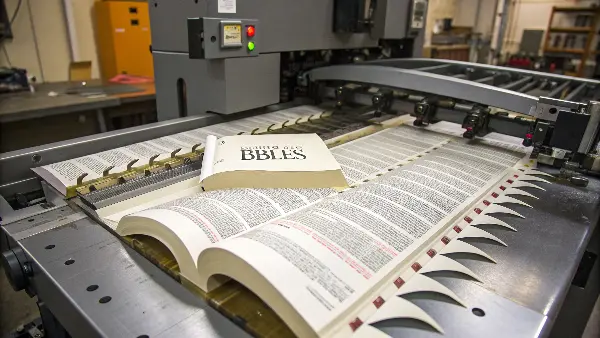
The manufacturing process is fascinating, isn’t it? It transforms a standard book block into a highly functional tool for study and devotion. But this is just the start. Understanding what thumb indexing is, how it’s made, and the options available can help you decide if it’s the right choice for your product line or personal use. Let’s explore the details behind this clever feature.
What Exactly Is Thumb Indexing on a Bible?
You’ve likely seen Bibles with cutouts on the side but might not be sure what they’re called or how they work. Without knowing the purpose, you might dismiss this feature as a purely aesthetic choice. This means you could miss out on a navigation tool designed for pure functionality and speed.
Thumb indexing is a series of semi-circular cuts made along the fore-edge of a Bible’s pages. Each cut, or "notch," corresponds to a different book or section, allowing you to place your thumb directly on it and open the Bible to that exact spot. The names of the books, like "Genesis" or "Exodus," are printed on the margin revealed by the cut. It’s a permanent, integrated alternative to stick-on Bible tabs, designed for quick and efficient navigation.
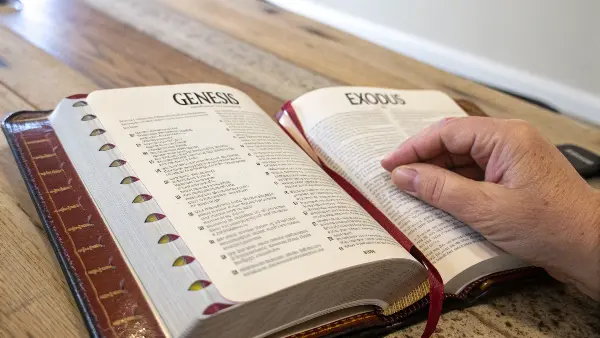
When we started exploring custom stationery, I was amazed by the precision of thumb indexing. It’s not just about cutting notches into paper; it’s a carefully planned design feature. The goal is to make a dense, 1,000+ page book feel as easy to navigate as a simple planner. A well-executed thumb index is a sign of quality manufacturing. It shows attention to detail in every aspect of the book’s creation.
Breaking Down the Components
The system works through three core components working together:
- The Notch: This is the physical C-shaped cutout.
- The Label: The printed book name on the page margin.
- The Staggering: The precise vertical placement of each notch so they don’t overlap.
This combination allows for a "cascade" effect down the side of the Bible. Your eye can quickly scan the labels, your thumb goes to the notch, and you open right to the first page of the book you need.
The User Experience
From a usability perspective, the design is brilliant. Think about it from a user’s point of view.
| Feature | User Benefit |
|---|---|
| Physical Cut | Provides a tactile guide, letting you feel for a section. |
| Printed Label | Offers a clear visual cue for which book you’re opening. |
| Staggered Design | Keeps all labels visible, even when the book is closed. |
Ultimately, thumb indexing transforms the Bible from a passive block of text into an interactive reference tool. It’s a small detail that makes a world of difference for daily readers, pastors, and students.
How Do You Create a Thumb-Indexed Bible?
So you’ve decided this feature is a good fit, but how is it actually applied? It seems complex and permanent, raising questions about whether it’s a DIY project or something that requires professional equipment. Can you do it yourself, or is it purely a manufacturing process applied before the book is sold?
Thumb indexing is almost exclusively done during the manufacturing process using industrial die-cutting machines. Attempting it as a DIY project is highly impractical and likely to damage the Bible. For existing Bibles, the only viable option is to send it to a specialized bookbinder who has the proper equipment. These professionals, often called rebinding services, can add indexing to a book, but it’s a niche and costly service.
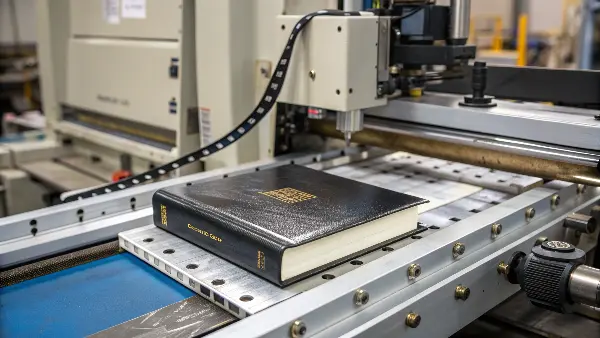
I remember talking with one of our manufacturing partners about this process. He explained that getting the alignment right is the hardest part. The text block, the die-cutter, and the pre-printed page labels must be aligned to within a fraction of a millimeter. Even a tiny shift can result in a cut that chops off part of a book’s name or lands in the wrong section. This is why it’s a job for precision machinery, not a craft knife at home.
The Professional Manufacturing Process
During production, indexing is one of the final steps before the cover is attached. Here’s a simplified breakdown:
- Printing: The pages are printed with the book names strategically placed on the outer margin, far from the main text. This requires special layout planning.
- Stacking: The printed and trimmed pages (the "book block") are clamped tightly together to prevent any shifting.
- Die-Cutting: A specialized machine with a stack of C-shaped blades, or a single blade that moves progressively, is used. The die is pressed into the side of the book block, cutting through a set number of pages for each index notch.
- Quality Control: Each indexed block is inspected for clean cuts, correct alignment with the printed labels, and consistent depth.
Can You Get Your Existing Bible Indexed?
While indexing is primarily a manufacturing step, a few specialized bookbinders offer it as an aftermarket service.
| Option | Pros | Cons |
|---|---|---|
| Buy Pre-Indexed | Cost-effective, professionally done, integrated into the design. | Limited to the specific Bible editions that offer this feature. |
| Specialist Service | Can be applied to your favorite, cherished Bible. | Expensive, requires shipping your Bible, and risks potential damage if not done by a true expert. Finding a provider is also difficult. |
| DIY Kits | Not recommended. There are no safe or effective DIY thumb-indexing kits. You are more likely to ruin your Bible. The closest alternative is stick-on tabs. | N/A |
In our experience at Panoffices, when a client wants an indexed product, we always integrate it into the initial production run. It ensures the highest quality and is far more cost-efficient than trying to add it later.
Should I Get a Thumb-Indexed Bible?
Deciding on a Bible can be personal, and features like indexing add another layer to the choice. You might feel torn, wondering if the convenience is worth it or if it just adds unnecessary complexity. You may also worry if the cuts could compromise the durability of the pages over time.
Yes, you should get a thumb-indexed Bible if you prioritize quick navigation and use your Bible for frequent study, preaching, or reference. It saves significant time compared to flipping pages or using a table of contents. However, if you prefer a minimalist aesthetic or are concerned about the slight potential for page tearing with heavy use, a non-indexed Bible with added tabs might be better.

I’ve used both types extensively over the years. For my desk Bible, which I use for deep study and cross-referencing, the thumb index is invaluable. It makes my workflow so much smoother. For a smaller, more portable Bible I carry with me, I prefer no indexing because the clean, simple edge feels more durable for travel. The choice really comes down to your primary use case.
A Clear Comparison: Pros and Cons
To make the decision easier, it helps to see the advantages and disadvantages side-by-side. This is the same logic we use when helping B2B clients decide on features for their custom stationery lines.
| Pros of Thumb Indexing | Cons of Thumb Indexing |
|---|---|
| Speed: Instantly find any book of the Bible. | Cost: Indexed Bibles are typically more expensive. |
| Permanence: It’s built-in and can’t fall off. | Durability: The thin paper at the cut can be prone to tearing over time with rough use. |
| Clean Look: Appears more integrated and professional than stick-on tabs. | Limited Options: Not all Bible translations, sizes, or cover styles are available with indexing. |
| Usability: Great for pastors, teachers, and new readers. | Aesthetics: Some users prefer the sleek, uniform look of a non-indexed page block. |
Who Benefits Most?
Certain users will find a thumb-indexed Bible especially helpful.
- Pastors and Speakers: When you need to flip between Old and New Testament passages during a sermon, speed is critical.
- Bible Students: For academic study or group lessons, quickly locating verses for comparison saves time and keeps the discussion flowing.
- New Bible Readers: The Bible can be intimidating. An index provides a clear map, making it less daunting to explore different books.
Ultimately, if your goal is to spend more time reading God’s Word and less time searching for it, a thumb-indexed Bible is an excellent investment.
Can You Put Bible Tabs on an Indexed Bible?
You might already own a thumb-indexed Bible but find its system isn’t detailed enough. Perhaps the indexing only groups books together, leaving you wanting a way to mark individual books. This presents a dilemma: is it okay to add stick-on tabs to an already indexed Bible, or will it create a messy, unusable system?
Yes, you can absolutely put Bible tabs on a thumb-indexed Bible. There is no rule against it, and it can create a highly customized navigation system. You can use tabs to mark individual books that are grouped under a single index notch or add them to the top of the page to create a secondary indexing system for different categories, like key stories or topics.
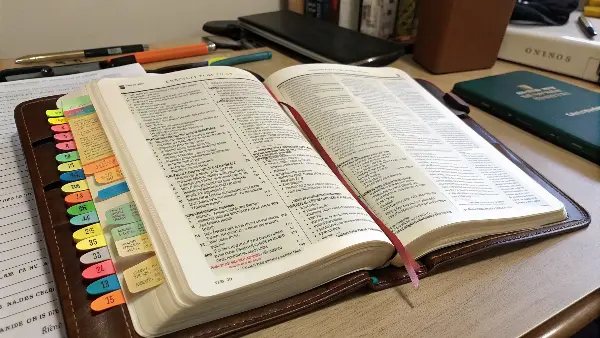
I worked with a client once who was developing a specialty study Bible. They loved the premium feel of thumb indexing but also wanted users to be able to mark their own key chapters. We designed the Bible with a standard thumb index and included a set of custom, color-coded sticker tabs as a bonus. The final product offered the best of both worlds: a permanent system for books and a flexible one for personal milestones.
How to Combine Indexing and Tabs Effectively
Combining these two systems can be incredibly powerful if done thoughtfully. It allows you to create a personalized, multi-layered navigation tool.
Use Case 1: Subdividing an Existing Index
Many thumb-indexed Bibles group the minor prophets or general epistles under one or two notches. For example, "Hosea – Malachi" might be a single index.
- Identify the Grouped Books: Look at your thumb index to see which books are bundled together.
- Apply Individual Tabs: Place a stick-on tab for each individual book within that group (e.g., a tab for Hosea, one for Joel, one for Amos, etc.).
- Result: You can now use the thumb index to get to the general section quickly, then use the stick-on tab to pinpoint the exact book you need.
Use Case 2: Creating a Separate Topical Index
You can also use tabs to create an entirely different kind of index that works alongside the book-based thumb index.
| Placement of Tabs | Purpose | Example |
|---|---|---|
| Side of Page | To mark individual books not covered by the main index. | Adding a tab for Philemon if it’s grouped with other epistles. |
| Top of Page | To create a separate topical or thematic index. | Marking sections on "Prayer," "Faith," or "Miracles." |
| Bottom of Page | To track a reading plan or highlight key chronological events. | A tab for each day of a "Bible in a Year" plan. |
This "dual-system" approach allows the permanent thumb index to handle the macro-navigation (finding books), while the flexible tabs handle the micro-navigation (finding specific chapters, themes, or personal points of interest). It’s a great way to make your Bible uniquely your own.
Conclusion
Bible thumb indexing is a feature where design meets function, turning a standard book into an efficient tool for study. From the precise manufacturing process to the practical benefits for daily use, it’s a detail that greatly enhances the reading experience. Whether you choose an indexed Bible or customize your own with tabs, your goal remains the same: easier access to the text.
